Hunt

Thursday, November 8, 2012

Left outer join vs NOT EXISTS in SQL


And to wrap up the miniseries on IN, EXISTS and JOIN, a look at NOT EXISTS and LEFT OUTER JOIN for finding non-matching rows.
For previous parts, see
I’m looking at NOT EXISTS and LEFT OUTER JOIN, as opposed to NOT IN and LEFT OUTER JOIN, because, as shown in the previous part of this series, NOT IN behaves badly in the presence of NULLs. Specifically, if there are any NULLs in the result set, NOT IN returns 0 matches.
The LEFT OUTER JOIN, like the NOT EXISTS can handle NULLs in the second result set without automatically returning no matches. It behaves the same regardless of whether the join columns are nullable or not. Seeing as NULL does not equal anything, any rows in the second result set that have NULL for the join column are eliminated by the join and have no further effect on the query.
It is important, when using the LEFT OUTER JOIN … IS NULL, to carefully pick the column used for the IS NULL check. It should either be a non-nullable column (the primary key is a somewhat classical choice) or the join column (as nulls in that will be eliminated by the join)
Onto the tests
The usual test tables…
?
01
02
03
04
05
06
07
08
09
10
11
12
13
14
15
16
17
18
19
20
21
22
CREATE TABLE BigTable (
id INT IDENTITY PRIMARY KEY,
SomeColumn char(4) NOT NULL,
Filler CHAR(100)
)
CREATE TABLE SmallerTable (
id INT IDENTITY PRIMARY KEY,
LookupColumn char(4) NOT NULL,
SomeArbDate Datetime default getdate()
)
INSERT INTO BigTable (SomeColumn)
SELECT top 250000
char(65+FLOOR(RAND(a.column_id *5645 + b.object_id)*10)) + char(65+FLOOR(RAND(b.column_id *3784 + b.object_id)*12)) +
char(65+FLOOR(RAND(b.column_id *6841 + a.object_id)*12)) + char(65+FLOOR(RAND(a.column_id *7544 + b.object_id)*8))
from master.sys.columns a cross join master.sys.columns b
INSERT INTO SmallerTable (LookupColumn)
SELECT DISTINCT SomeColumn
FROM BigTable TABLESAMPLE (25 PERCENT)
-- (3918 row(s) affected)
First without indexes
?
1
2
3
4
5
6
7
8
-- Query 1
SELECT BigTable.ID, SomeColumn
  FROM BigTable LEFT OUTER JOIN SmallerTable ON BigTable.SomeColumn = SmallerTable.LookupColumn
  WHERE LookupColumn IS NULL
-- Query 2
SELECT ID, SomeColumn FROM BigTable
WHERE NOT EXISTS (SELECT LookupColumn FROM SmallerTable WHERE SmallerTable.LookupColumn = BigTable.SomeColumn)
Let’s take a look at the execution plans
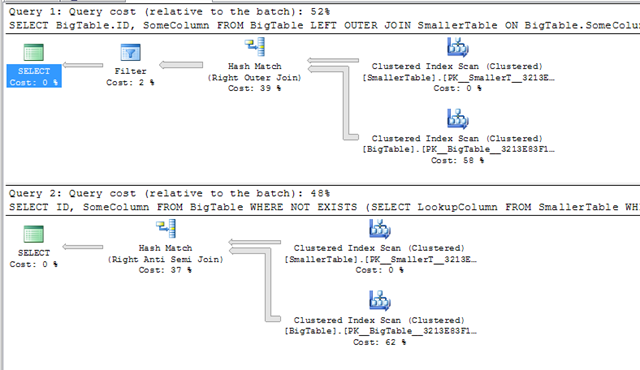
LeftOuterJoinNotIN_NotIndexed
The plans are almost the same. There’s an extra filter in the JOIN and the logical join types are different. Why the different joins?
If we look at the execution plan for the NOT EXISTS, the join type is Right Anti-Semi join (a bit of a mouthful). This is a special join type used by the NOT EXISTS and NOT IN and it’s the opposite of the semi-join that I discussed back when I looked at IN and INNER JOIN
An anti-semi join is a partial join. It does not actually join rows in from the second table, it simply checks for, in this case, the absence of matches. That’s why it’s an anti-semi join. A semi-join checks for matches, an anti-semi join does the opposite and checks for the absence of matches.
The extra filter in the LEFT OUTER JOIN query is because the join in that execution plan is a complete right join, i.e. it’s returned matching rows (and possibly duplicates) from the second table. The filter operator is doing the IS NULL filter.
That’s the major difference between these two. When using the LEFT OUTER JOIN … IS NULL technique, SQL can’t tell that you’re only doing a check for nonexistance. Optimiser’s not smart enough (yet). Hence it does the complete join and then filters. The NOT EXISTS filters as part of the join.
Technical discussion done, now how did they actually perform?
– Query 1: LEFT OUTER JOIN
Table ‘Worktable’. Scan count 0, logical reads 0, physical reads 0.
Table ‘BigTable’. Scan count 1, logical reads 3639, physical reads 0.
Table ‘SmallerTable’. Scan count 1, logical reads 15, physical reads 0.
SQL Server Execution Times:
CPU time = 157 ms,  elapsed time = 486 ms.
– Query 2: NOT EXISTS
Table ‘Worktable’. Scan count 0, logical reads 0, physical reads 0.
Table ‘BigTable’. Scan count 1, logical reads 3639, physical reads 0.
Table ‘SmallerTable’. Scan count 1, logical reads 15, physical reads 0.
SQL Server Execution Times:
CPU time = 156 ms,  elapsed time = 358 ms.
Can’t make a big deal out of that.
Now, index on the join columns
?
1
2
3
4
5
CREATE INDEX idx_BigTable_SomeColumn
ON BigTable (SomeColumn)
CREATE INDEX idx_SmallerTable_LookupColumn
ON SmallerTable (LookupColumn)
and the same queries
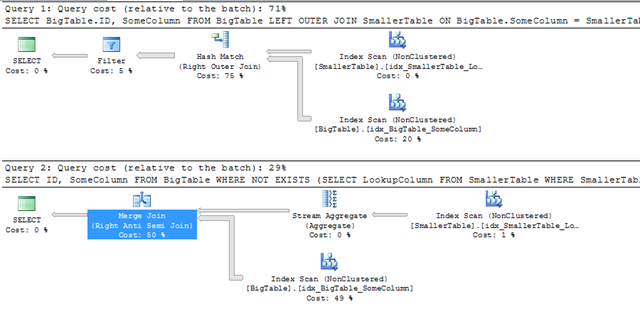
LeftOuterJoinNotIN_Indexed
With indexes added, the execution plans are even more different. The LEFT OUTER JOIN is still doing the complete outer join with a filter afterwards. It’s interesting to note that it’s still a hash join, even though both inputs are sorted in the order of the join keys.
The Not Exists now has a stream aggregate (because duplicate values are irrelevant for an EXISTS/NOT EXISTS) and an anti-semi join. The join here is no longer hash, it’s now a merge join.
This echoes what I found when looking at IN vs Inner join. When the columns were indexed, the inner join still went for a hash join but the IN changed to a merge join. At the time, I thought it to be a fluke, I’m not so sure any longer. More tests on this are required…
The costing of the plans indicates that the optimiser believes that the LEFT OUTER JOIN form is more expensive. Do the execution stats carry the same conclusion?
– Query 1: LEFT OUTER JOIN
Table ‘Worktable’. Scan count 0, logical reads 0, physical reads 0.
Table ‘BigTable’. Scan count 1, logical reads 342, physical reads 0.
Table ‘SmallerTable’. Scan count 1, logical reads 8, physical reads 0.
SQL Server Execution Times:
CPU time = 172 ms,  elapsed time = 686 ms.
– Query 2: NOT EXISTS
Table ‘BigTable’. Scan count 1, logical reads 342, physical reads 0.
Table ‘SmallerTable’. Scan count 1, logical reads 8, physical reads 0.
SQL Server Execution Times:
CPU time = 78 ms,  elapsed time = 388 ms.
Well, yes, they do.
The reads (ignoring the existence of the worktable for the hash join) are the same. That’s to be expected, both queries executed with a single scan of each index.
The CPU time figures are not. The CPU time of the LEFT OUTER JOIN form is almost twice that of the NOT EXISTS.

In conclusion…

If you need to find rows that don’t have a match in a second table, and the columns are nullable, use NOT EXISTS. If you need to find rows that don’t have a match in a second table, and the columns are not nullable, use NOT EXISTS or NOT IN.
The LEFT OUTER JOIN … IS NULL method is slower when the columns are indexed and it’s perhaps not as clear what’s happening. It’s reasonably clear what a NOT EXISTS predicate does, with LEFT OUTER JOIN it’s not immediately clear that it’s a check for non-matching rows, especially if there are several where clause predicates.
I think that’s about that for this series. I’m going to do one more post summarising all the findings, probably in a week or two.

URL:
http://sqlinthewild.co.za/index.php/2010/03/23/left-outer-join-vs-not-exists/

Monday, October 8, 2012

Automatically Redirect HTTP requests to HTTPS on IIS 7 using URL Rewrite


URL:

In a previous article I covered the installation URL Rewrite 2.0 for IIS 7. This is a plug-in for IIS 7 that allows you to manipulate URL’s.
URL Rewrite has a GUI to allow you to enter rules within IIS 7; in the background all this does is edit the web.config file of the site. I will show you how to create a rule both ways.
In the following example we will redirect HTTP to HTTPs using URL Rewrite. You will need the following items completed in order for this to work correctly.
- SSL Certificate for site installed in IIS.
- Site properly installed and configured for SSL (site set up and binding in IIS configured).
- URL Rewrite 2.0 is installed on the sever.
GUI Version
- Select the website you wish to configure
- In the “Features View” panel, double click URL Rewrite


You will notice there are currently no rules configured for this site. Click “Add Rules…” in the Actions menu to the right of the “Features View” panel


Use the default “Blank rule” and press “OK”.


When editing a rule there are the “Name” field and 4 configuration pull down boxes.
- Enter “Redirect to HTTPS” in the name field.
- Next we will configure the first configuration pull down box called “Match URL”, on the right side of “Match URL” press the down arrow to expand the box


Within the “Match URL” configuration box we will set the following settings:
Requested URL: Matches the Pattern
Using: Regular Expressions
Pattern: (.*)


We can now edit the next configuration pull down box which is “Conditions”,
 Press “Add…” to add a newcondition to the configuration.


We will configure the condition with the following settings:
Condition Input: {HTTPS}
Check if input string: Matches the Pattern
Pattern: ^OFF$
Press “OK” 


You should see your condition in the list of conditions.


For this setting we do not need to configure the “Server Variables” pull down box. Continue onto the “Action” configuration box and pull down the box by selecting the arrow on the right. We will configure the following settings for the “Action” configuration:
Action Type: Redirect
Redirect URL: https://{HTTP_HOST}/{R:1}
Redirect Type: See Other (303)


Press “Apply” then press “Back to Rules”

You should now see the rule configured on the main screen of the URL Rewrite module.


Test your site, it should now redirect from HTTP to HTTPS.

If we exam the web.config file we can see where the rule was entered. If we entered the rule directly into the web.config file it would show up in the GUI


Friday, October 5, 2012

SQL SERVER – Finding Last Backup Time for All Database


SELECT sdb.Name AS DatabaseName,COALESCE(CONVERT(VARCHAR(12), MAX(bus.backup_finish_date), 101),'-') ASLastBackUpTimeFROM sys.sysdatabases sdbLEFT OUTER JOIN msdb.dbo.backupset bus ON bus.database_name = sdb.nameGROUP BY sdb.Name


-------------------------
URL:

Backup ALL your SQL Server databases using ONE script


DECLARE @DBName varchar(255)

DECLARE @DATABASES_Fetch int

DECLARE DATABASES_CURSOR CURSOR FOR
    select
        DATABASE_NAME   = db_name(s_mf.database_id)
    from
        sys.master_files s_mf
    where
       -- ONLINE
        s_mf.state = 0

       -- Only look at databases to which we have access
    and has_dbaccess(db_name(s_mf.database_id)) = 1

        -- Not master, tempdb or model
    and db_name(s_mf.database_id) not in ('Master','tempdb','model')
    group by s_mf.database_id
    order by 1

OPEN DATABASES_CURSOR

FETCH NEXT FROM DATABASES_CURSOR INTO @DBName

WHILE @@FETCH_STATUS = 0
BEGIN
    declare @DBFileName varchar(256)  
    set @DBFileName = datename(dw, getdate()) + ' - ' +
                       replace(replace(@DBName,':','_'),'\','_')

    exec ('BACKUP DATABASE [' + @DBName + '] TO  DISK = N''d:\db\' +
        @DBFileName + ''' WITH NOFORMAT, INIT,  NAME = N''' +
        @DBName + '-Full Database Backup'', SKIP, NOREWIND, NOUNLOAD,  STATS = 100')

    FETCH NEXT FROM DATABASES_CURSOR INTO @DBName
END

CLOSE DATABASES_CURSOR
DEALLOCATE DATABASES_CURSOR


------------------------------

URL:
http://www.geekzilla.co.uk/View487F82A5-C96B-4660-A070-F7C8B7FC4431.htm

Wednesday, September 12, 2012

add new line in a generic list c#


 public  StringBuilder SpliceText(string datetme, string text, int lineLength)
        {
           // return Regex.Replace(text, "(.{" + lineLength + "})", "$1" + Environment.NewLine);
            string _s= Regex.Replace(text, "(.{" + lineLength + "})", "$1" + Environment.NewLine);
            //sb.Append(datetme+"\n"+ _s);
            sb.Append(Environment.NewLine);

            sb.Append(_s);
            sb.Append(Environment.NewLine);
            _list.Add(datetme.ToString());
           // _list.Add("\n");
            _list.Add(_s);
            _list.Add("\n");
            return sb;

        }
---------------------------------------------------------
        static IEnumerable Split(string str, int chunkSize)
        {
            return Enumerable.Range(0, str.Length / chunkSize)
                .Select(i => str.Substring(i * chunkSize, chunkSize));
        }
------------------------------------
call
-------

cust.ForEach(p => SpliceText(p.Name.ToString(), p.Comment.ToString(), 140));


            IEnumerable ss = Split(sb.ToString(), 800);  

get stackpanel inside control values in datagrid in silverlight


Stackpanel Inside Controls in datagrid:

if we have button inside datagrid the click the button and add the below lines
 StackPanel stackpanel = ((Button)sender).Parent as StackPanel;
    TextBox txtName = stackpanel.Children[0] as TextBox;
    TextBox txtLName = stackpanel.Children[1] as TextBox;
URL:http://forums.silverlight.net/t/173626.aspx/1

Thursday, May 10, 2012

web service reference not adding in serviceref.clientconfig in SL class library or failed to generate code for the service reference in SL5


i have created a silverlight application.

in silverlight.web application i created web service after that i created a silverlight class library project .

now i try to adding the reference of the web service , i added it successfully but the service informations are not in serviceref.clientconfig file.

or 

it will also throw a error message like below
"Silverlight - failed to generate code for the service reference"

it shows only in my serviceref.clientconfig file.

to solve this issue do the following,


Option 1:

Use this option if your WCF service reference is not added into your project.

In “Add Service Reference” dialog click on “Advanced…” button. This will open Service Reference Settings dialog box.

In the Settings dialog box uncheck the “Reuse types in referenced assemblies” check box and click on Ok button.

Once you click on Ok button in Service Reference dialog box, the client code will be generated and you will not get any error. Now if you open “Reference.cs” file you can see the generated code.

Option 2:

Use this option if the service reference is already added into your project.

Right click on the service reference and select “Configure Service Reference…” option.


This will open “Service Reference Settings” dialog box (see image #2 in Option 1). Now as I mentioned in Option #1, uncheck “Reuse types in referenced assemblies” and click on Ok button.

Right click on service reference and select “Update Service Reference”. Once the service reference is updated you can see the client code is generated, you may verify this in “Reference.cs” file.


URL:
http://www.c-sharpcorner.com/Blogs/2115/...efere.aspx